
Most businesses do not need “AI everywhere.”
They usually have a much more specific problem: an enquiry arrives, someone copies it into another system, a follow-up has to be written, a task needs to be created, information has to be checked, and someone has to remember what happens next.
An AI agent can be useful when it removes that kind of repetitive handoff without removing the human decision that matters.
That distinction is important. An AI agent is not simply a chatbot with a new name, and it is not automatically the right solution for every workflow.
This guide explains what AI agents can realistically do for a business in 2026, where they make sense, what drives their cost, and when a custom system is worth building.
What is an AI agent?
An AI agent is software that can receive a goal or event, understand the context around it, decide what action should happen next, and use connected tools or systems to carry out part of that work.
The important word is action.
A normal chatbot mostly waits for a question and returns an answer. An agent can be connected to business systems and allowed to perform defined steps: retrieve a customer record, classify an enquiry, prepare a response, update a CRM, create a task, check a document, or send something for approval.
Microsoft describes AI agents as software programs that can interpret inputs, reason about a problem and decide on appropriate actions. Google similarly describes agentic systems as tools that can interpret goals, plan multi-step actions and work across connected systems.
Microsoft: AI agent adoption guidance · Google Cloud: AI agents in business
AI agents vs chatbots vs traditional automation
These terms are often mixed together, but they solve different problems.
| System | Best suited to | Typical behaviour |
|---|---|---|
| Chatbot | Questions, support and information retrieval | Receives a prompt and returns a response |
| Traditional automation | Predictable rules and repeatable steps | If X happens, perform Y |
| AI agent | Workflows where context affects the next step | Interprets information, chooses from allowed actions and uses connected tools |
The difference matters because an agent adds complexity.
If a workflow is completely predictable, adding an AI model often makes the system more expensive and less deterministic for no useful reason.
Microsoft’s current guidance makes the same point: when a task is structured, predictable and governed by strict rules, regular software or non-generative automation is often the better choice.
In other words, the question should not be:
“Where can we add an AI agent?”
A better question is:
“Which part of this workflow currently requires interpretation, judgement or repeated manual handling?”
What can AI agents automate in a business?
The strongest use cases tend to sit between simple automation and a decision that still needs human ownership.
1. Lead intake and qualification support
A website enquiry can contain far more useful information than a name and email address.
An agent can read the enquiry, identify the requested service, pull out company information, detect urgency, check whether required details are missing and prepare a structured lead record.
That record can then be passed into a CRM or internal system without someone manually copying every field.
The agent does not have to decide whether the company should accept the work. It can prepare the information so a person can make that decision faster.
2. Follow-up preparation
A business can use an agent to prepare a follow-up based on the enquiry, the service requested and information already stored about the customer.
For higher-value conversations, the safer workflow is often:
- The enquiry enters the system.
- The agent prepares a relevant draft.
- A team member reviews it.
- The approved response is sent.
- The CRM and next action are updated.
This removes repetitive writing and copying without pretending every customer conversation should happen without supervision.
3. Customer-support triage
Support requests can be classified before a team member opens them.
An agent may be able to identify the account involved, find relevant documentation, summarise the issue, suggest the correct department and prepare a draft response.
Straightforward requests can follow an approved workflow. Sensitive, unusual or high-risk cases can be escalated.
4. Internal knowledge retrieval
Teams often lose time because information exists, but nobody remembers where it lives.
A properly designed agent can search approved internal sources and help staff retrieve policies, project information, product details or operational documentation without manually searching several tools.
The quality of this use case depends heavily on the quality of the underlying information. Giving an agent access to an untidy document library does not magically make that library reliable.
5. Document processing
Documents are a good example of work that often combines fixed rules with interpretation.
An agent can extract relevant information from submitted documents, compare it with known data, flag missing items and prepare the result for review.
This can be useful for quotations, onboarding documents, applications, internal reports and other document-heavy workflows.
6. Operations and task coordination
An agent can help keep work moving between systems.
For example, after an approved customer action it might update a record, create the next task, attach the relevant context and notify the correct person.
The value is not that the task itself is impressive. The value is that someone no longer has to remember five small administrative steps after every customer interaction.
7. Research and information gathering
Agents can also collect information from approved sources, organise it and prepare a summary for a person to review.
This can reduce time spent on repetitive research, but important facts should still be traceable to their sources. A useful business system should make verification easier, not hide where an answer came from.
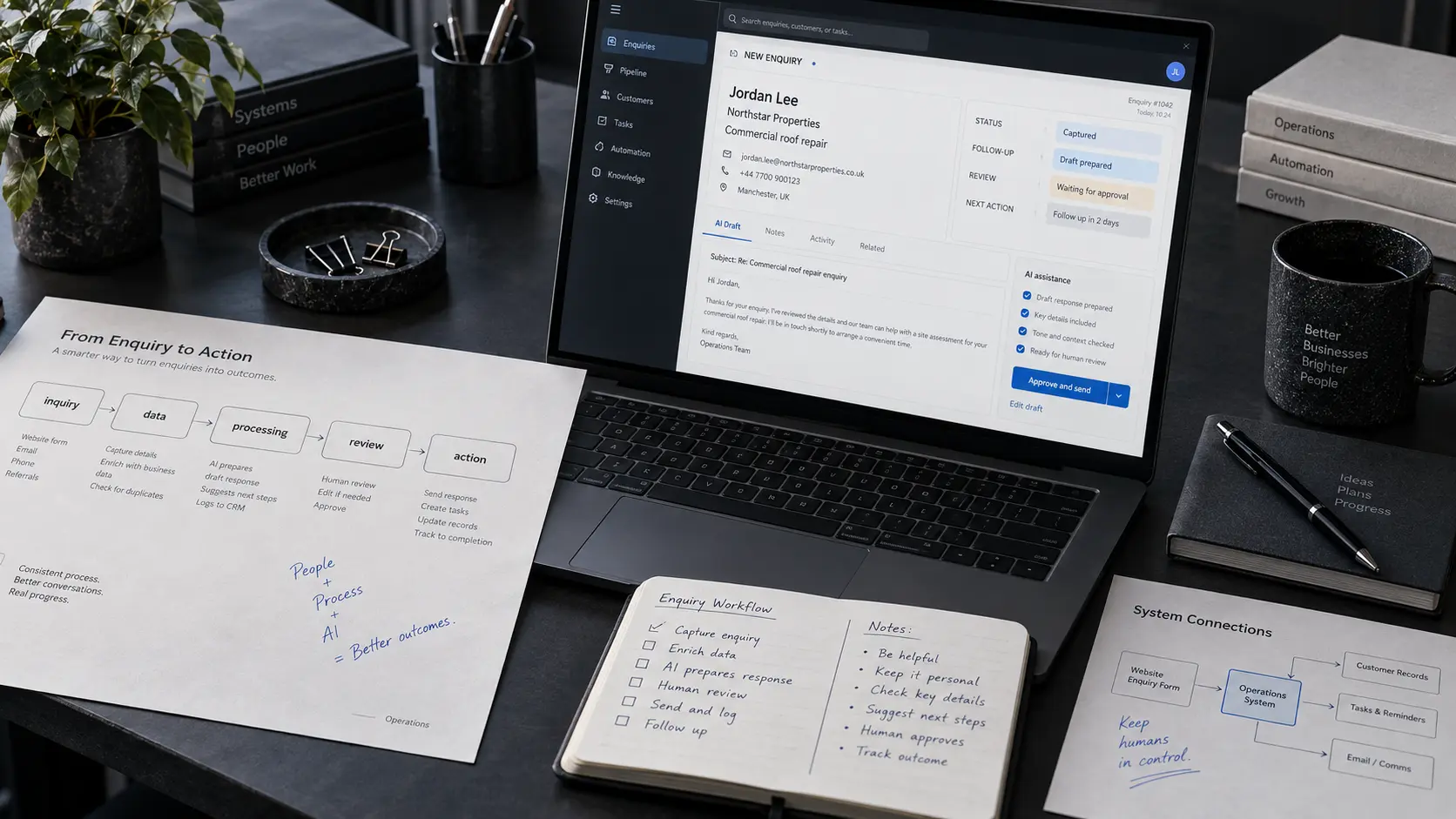
A practical example: what happens after someone requests a quote?
Consider a commercial service business.
A visitor completes a quote form on the website:
- Name: Jordan Lee
- Company: Northstar Properties
- Service: Commercial roof repair
- Message: Water is entering one section of a warehouse after heavy rain.
Without an integrated system, somebody may need to:
- read the email,
- copy the details into a CRM,
- choose the correct service category,
- write a reply,
- create a follow-up task,
- notify the right team member,
- and remember to update everything later.
An agent-assisted workflow could instead prepare those handoffs automatically.
The enquiry becomes structured data. The CRM record is prepared. A follow-up is drafted. The next task is created. The relevant team member receives the context.
The person still decides whether to approve the response, book the inspection or take another action.
That is a much more useful way to think about business AI: not replacing the business process, but removing friction inside it.
Should AI agents work without human approval?
Sometimes. Not always.
The right amount of autonomy depends on what the action can affect.
Low-risk actions can often be automated more aggressively. Examples might include formatting internal information, routing a request or preparing a draft.
Actions involving money, contractual commitments, sensitive customer communication, account permissions or important business decisions usually deserve tighter controls.
A useful design principle is:
Let the system handle repeatable movement of information. Keep people in control of consequential decisions.
Microsoft’s enterprise guidance also treats governance, security, monitoring and lifecycle management as part of agent adoption rather than optional work to add later.
How much does an AI agent cost in 2026?
There is no useful single price for an “AI agent.”
A small internal assistant connected to one controlled data source and a custom system operating across a CRM, email, internal database, website and approval workflow are completely different projects.
It helps to separate the cost into four parts.
1. Software or model usage
Most commercial AI platforms charge through subscriptions, usage, API consumption or a combination of them.
As one current example, OpenAI lists ChatGPT Business standard seats at $20 per user per month when billed annually, while enterprise and usage-based arrangements have different pricing structures.
See current OpenAI business pricing
That subscription cost should not be confused with the cost of designing a custom business workflow.
2. Integration work
Connecting the agent to existing systems is often where most of the real engineering begins.
The work may include:
- CRM integration,
- website forms,
- internal databases,
- email or messaging systems,
- authentication and permissions,
- document storage,
- business rules,
- logging and audit history.
3. Reliability and safety
A prototype that works during a demo is not the same thing as a production system.
Production work includes failure handling, validation, permission boundaries, testing, monitoring, fallbacks and clear rules for when the system must ask a person instead of taking an action.
4. Ongoing operation
AI systems need maintenance just like other software.
Providers change models. APIs change. Business processes change. Internal data changes. A workflow that was correct six months ago may no longer reflect how the team actually works.
Budgeting should therefore include monitoring and iteration, not only the initial build.
What makes one AI-agent project more expensive than another?
Cost usually rises with complexity, not with the number of times the word “AI” appears in the proposal.
| Factor | Lower complexity | Higher complexity |
|---|---|---|
| Systems involved | One or two tools | Several business systems and APIs |
| Data | Clean, structured information | Scattered or inconsistent sources |
| Actions | Drafting and classification | Actions that change customer or business records |
| Approvals | Simple review step | Multiple roles and permission levels |
| Reliability | Internal low-risk workflow | Customer-facing or operationally critical process |
| Volume | Occasional use | Large numbers of requests or documents |
This is why a serious quote should start with the workflow rather than a fixed “AI agent package.”
Should you buy an AI tool or build a custom agent?
Start with the simplest option that genuinely solves the problem.
Buy or configure an existing product when:
- the workflow is common across many businesses,
- your existing software already offers the capability,
- you do not need unusual integrations,
- the product’s workflow fits the way your team already works,
- and switching your process is cheaper than building your own system.
Consider a custom agent when:
- the workflow crosses several systems,
- staff repeatedly move the same information by hand,
- your business has rules that generic software does not understand,
- you need specific approval or permission controls,
- the workflow is valuable enough to justify owning the integration,
- or the agent needs to live inside a larger custom platform.
There is also a middle ground.
Many good systems combine existing AI services with custom business logic. The business does not need to build a language model. It needs to build the workflow around the model correctly.
When should you not build an AI agent?
This is one of the most useful questions in the entire project.
Do not use an agent just to automate a fixed rule
If the process is:
“When form A is submitted, create task B.”
normal automation is likely enough.
Do not start with AI when the workflow itself is unclear
Automating a broken process usually produces a faster broken process.
First decide who owns each step, what information is required, what the correct outcome is and where human approval belongs.
Do not give an agent broad access simply because integration is possible
Access should be limited to what the workflow actually requires.
Do not expect an agent to repair poor business data
McKinsey’s 2026 work on agentic AI highlights data quality and data architecture as major constraints on scaling agent systems. If customer information is duplicated, documents conflict and internal records are unreliable, the agent inherits those problems.
Why do AI-agent projects fail?
The technical model is not always the hardest part.
Common problems include:
- choosing a vague use case with no measurable outcome,
- connecting unreliable data,
- giving the system too much autonomy too early,
- building a demo without designing failure states,
- creating an agent that lives outside the tools employees actually use,
- and failing to assign ownership after launch.
The gap between experimentation and useful deployment is visible in current research.
McKinsey’s 2026 State of AI survey reports that agentic AI adoption is increasing, particularly in large organisations, but scaling is still far from universal. Its other 2026 research points to weak data foundations as one of the major barriers to turning experiments into reliable operational systems.
The practical lesson is straightforward: start with one workflow where success can actually be measured.
How to choose the first workflow to automate
Look for work with all or most of these characteristics:
- it happens frequently,
- people repeat similar steps each time,
- information moves between systems,
- some interpretation is required,
- mistakes or delays have a measurable cost,
- and the correct human approval point is clear.
Then document the current workflow before designing the new one.
A useful map is:
- Trigger: What starts the process?
- Context: What information does the system need?
- Reasoning: Which parts require interpretation?
- Actions: What systems may the agent use?
- Approval: What must a person decide?
- Fallback: What happens when information is missing or confidence is low?
- Measurement: What result tells us the system is actually useful?
This gives the project a business objective rather than an AI objective.
How should you measure the ROI of an AI agent?
“We launched an agent” is not a useful success metric.
Measure the workflow.
Depending on the use case, useful metrics can include:
- time from enquiry to first response,
- manual steps removed per case,
- percentage of drafts approved without major rewriting,
- time spent searching internal information,
- support triage time,
- processing errors,
- tasks completed on time,
- and cost per completed workflow.
Measure the old process first where possible. Without a baseline, it is difficult to know whether the new system improved anything.
What about security and governance?
An agent connected to real business systems should be treated like software with permissions, not like a clever chat window.
A production design should consider:
- which information the agent is allowed to access,
- which actions it can perform,
- which actions require approval,
- how authentication is handled,
- what gets recorded in logs,
- how failures are surfaced,
- and who is responsible for reviewing the system over time.
Current enterprise guidance from Microsoft and Google puts governance and lifecycle management alongside the building process itself. That is the right way to think about it: controls are part of the product, not paperwork added after launch.
Are AI agents useful for small businesses?
They can be, but smaller businesses should be especially selective.
A large company may be able to justify an agent for a narrow process because that process happens thousands of times.
A smaller company usually gets more value by focusing on a workflow that directly affects sales, customer service or administrative time.
Examples could include:
- turning website enquiries into structured leads,
- preparing quote follow-ups,
- organising incoming support requests,
- extracting information from routine documents,
- or keeping a CRM and task system in sync after customer activity.
One useful connected workflow is generally more valuable than five disconnected AI experiments.
What is changing with AI agents in 2026?
The biggest change is not that models suddenly became capable of doing every job.
It is that businesses now have more practical ways to connect models to tools, data and workflows.
Adoption is moving beyond basic chat interfaces. McKinsey’s August 2026 survey found that 40% of respondents from organisations with more than $1 billion in annual revenue reported scaling AI agents, compared with 22% among smaller organisations.
That does not mean every company should race to deploy them.
It means the useful question has changed from:
“Can AI produce something impressive?”
to:
“Can this system reliably improve a real workflow?”
Questions to answer before building an AI agent
Before choosing a platform or writing code, answer these:
- What exact workflow are we improving?
- How is that work performed today?
- Where does interpretation actually matter?
- Which systems contain the required information?
- Is that information reliable?
- What actions may the agent perform?
- Which decisions must remain human?
- What happens when the agent is uncertain?
- How will every important action be logged?
- What metric will tell us whether the project worked?
If those questions cannot be answered yet, the next step is probably workflow design rather than agent development.
Frequently asked questions
What is an AI agent for business?
A business AI agent is software that can interpret a goal or event, use business context, choose from permitted actions and interact with connected tools or systems. It can assist with workflows such as lead handling, support triage, document processing, research and internal operations.
Is an AI agent the same as a chatbot?
No. A chatbot mainly responds to messages. An agent can be designed to carry out multi-step work using connected systems, although some products combine both capabilities in one interface.
Can AI agents replace employees?
A better design goal is usually to automate specific repetitive tasks rather than treat an entire job as one automatable unit. Many business workflows still need human judgement, approval, relationship management or accountability.
How much does an AI agent cost?
Cost depends on the software or models used, the number of integrations, data quality, workflow complexity, security requirements, usage volume, testing and ongoing maintenance. A tool subscription and a custom production integration are different cost categories.
Should a small business build a custom AI agent?
Only when the workflow is valuable enough to justify it. If an existing product solves the problem well, buying is usually simpler. Custom development becomes more useful when the workflow is specific to the business or needs several systems to work together.
What should a business automate first?
Start with a frequent workflow that contains repetitive manual handoffs, has clear inputs and outcomes, and can be measured before and after automation.
The useful agent is usually the boring one
The most valuable AI system in a business may never produce a dramatic demo.
It may simply make sure an enquiry reaches the right place, the CRM is updated, the follow-up is prepared, the next task exists and a person is asked to approve the decision that matters.
That is enough.
Good automation should make the operation feel simpler. If the AI itself becomes the centre of attention, the workflow may have been designed around the technology instead of the business.
What would you automate first?
If your team is still moving the same information between forms, inboxes, spreadsheets, CRMs and task tools by hand, start with that workflow.
We design connected websites, custom software and AI-assisted systems around the way a business actually operates.