
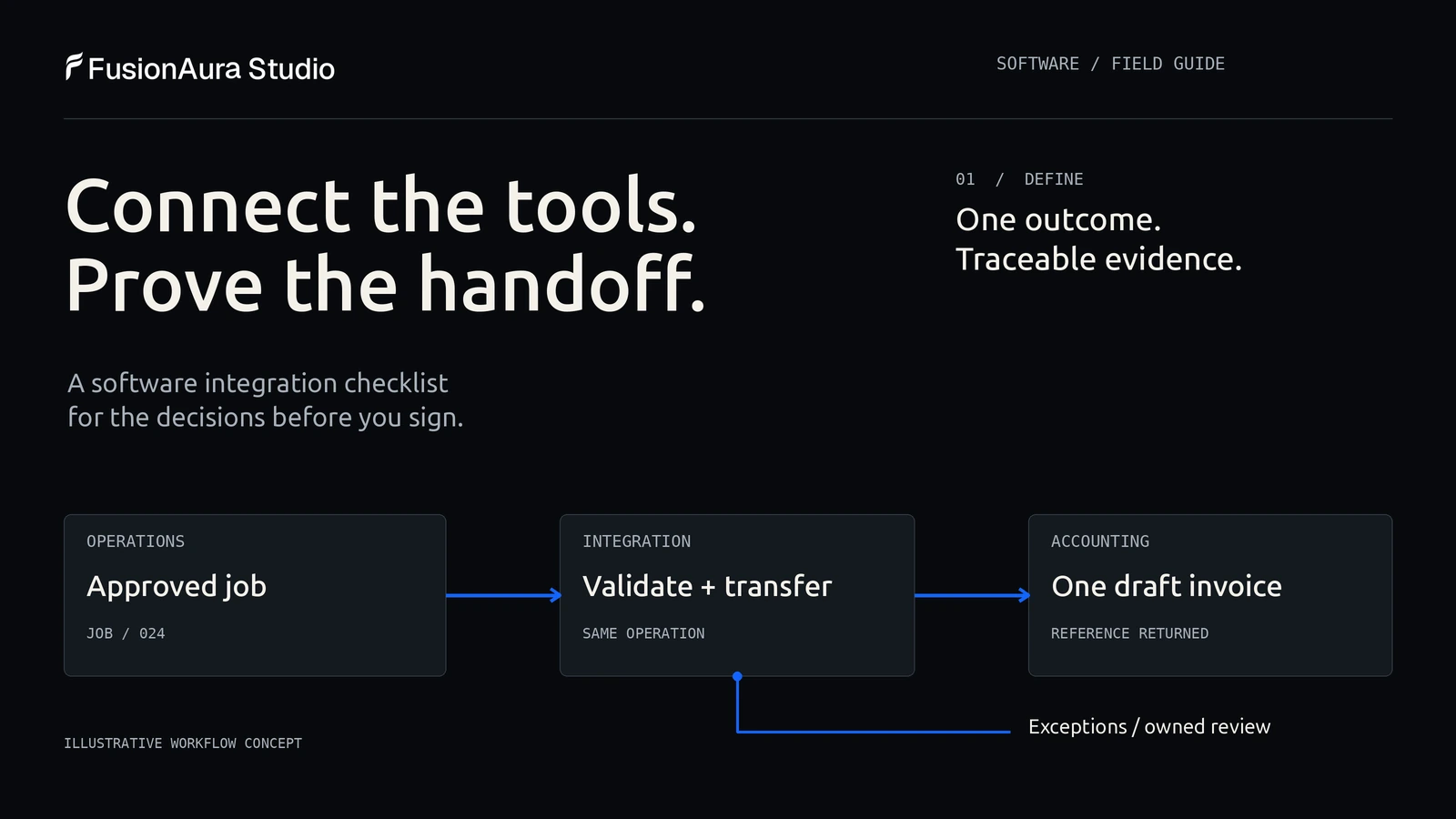
Your CRM says a job is approved. Your operations tool says it is waiting. Someone in accounts is copying the same customer details into an invoice.
Connecting the tools sounds straightforward. The difficult questions arrive a little later: Which record should win? What happens if an invoice is created but the confirmation never comes back? Who notices a transfer that has stopped working?
Before commissioning a software integration, agree on the business outcome, data ownership, permitted actions, failure handling, acceptance tests and ongoing support. A connector demonstration proves that two products can communicate. Your buying decision needs evidence that the whole workflow can be operated and recovered.
This checklist is for owners and operations teams connecting existing business tools, whether the work involves a native connector, an automation platform or custom development.
Use the checklist at three buying decisions
Before approving the full build: ask the supplier to prove the required operation on the actual product plans, using representative test data. An unknown API capability belongs in discovery before it becomes a fixed-price promise.
Before launch: require the normal transaction and its failure cases to pass. Keep unresolved business exceptions visible and assign someone to accept the remaining risk.
At handover: have a different authorised operator find a failed transaction and follow the recovery instructions. A workflow that only its original developer can rescue is not ready for an unsupported handover.
The sections below give you the decisions and evidence for each gate. Use only the controls the workflow needs; a small daily transfer does not automatically need every feature of an enterprise integration platform.
1. Define one finished business outcome
Start with an action someone can verify in the receiving system. “Connect our CRM to accounting” leaves too much open.
A more useful requirement is: “When an approved job is ready for billing, create one draft invoice against the correct customer, attach its reference to the job, and send unresolved cases to accounts for review.”
The word draft matters. So do approved, one and correct customer. Each describes a business rule that a developer cannot responsibly infer from two product names.
Record the starting event, the final visible result and the person who accepts that result. Also record the boundary. Perhaps the first release creates drafts but does not send invoices, collect payments or synchronise historical jobs.
If you are still deciding whether to replace software or connect what you have, our guide to websites, web applications and SaaS covers that broader decision. Integration deserves its own scope once the existing tools are staying.
2. Check the actual products, plans and interfaces
List the exact product, edition, subscription plan and account owner for each system. Ask the supplier to verify the actions and fields available through its supported interfaces.
An API is a documented way for software to request data or actions from another system. Having an API does not establish that it supports your particular operation. A connector might create contacts but omit custom fields, attachments, invoice status or deletions.
Request a small feasibility test before agreeing to the full implementation. Include a representative custom field or attachment if the business depends on it, rather than testing only the standard name and email fields. Check whether a test environment is available and whether its behaviour differs from production. Record any plan upgrade, marketplace approval or vendor involvement needed to go live.
Capacity matters too. Xero documents API rate limits, including a response telling an integration when to retry after a limit is exceeded. The useful buying question is not simply “Does it connect to Xero?” It is “Can the proposed design handle our normal workload, initial import and busiest period within the current limits?”
Avoid designing around a vendor's numeric limits from an old proposal. Ask the implementer to link the current documentation and explain the assumptions in the estimate.
3. Choose who owns each field
“Keep everything in sync” can conceal conflicting instructions. Sales may update a customer's trading name while accounts maintains the legal billing name. Those fields serve different purposes.
Agree on authority at field level. The CRM might own the sales contact and account manager; accounting might own the billing address and payment status. Your operations tool might own the job completion date.
| Information | Example authoritative system | Rule to agree |
|---|---|---|
| Sales contact | CRM | Update the contact without overwriting the billing entity. |
| Job approval | Operations tool | Only the approved job version can become ready for billing. |
| Invoice reference | Accounting | Return the reference to the job; do not create a second invoice when retrying. |
| Payment status | Accounting | Show it elsewhere as a copy; do not let a CRM edit mark an invoice paid. |
Illustrative allocation only. Your team must choose the authority for its own workflow.
Two-way synchronisation is appropriate when both systems genuinely need to edit shared information and the conflict rules are explicit. A one-way transfer can be easier to operate when only one system should make changes.
Decide how records are matched. An email address may change or be shared by several contacts. Ask how stable identifiers are stored, how existing duplicates are handled, and who reviews a match the system cannot safely resolve. Do not let uncertain matching silently merge customers.
4. Specify timing in business terms
A nightly batch may be adequate for a management report. A booking confirmation may need a much faster response. “Real time” is too vague to be an acceptance criterion.
Agree on the normal delay, the maximum acceptable delay and what users see while an update is pending. Those are requirements to negotiate, not universal performance benchmarks.
A webhook is a notification sent when an event happens. Polling checks for changes at intervals. Either can fit the job. Ask what happens if a notification is missed, the destination is unavailable or a burst of work exceeds the processing rate.
For example, the proposed workflow might show “Invoice pending” until the accounting system returns a reference. It should not show “Invoiced” simply because a request was sent.
Faster updates can introduce more moving parts. Choose the timing the operation needs and test it at a representative volume.
5. Design retries without repeating the business action
A request times out. Did the receiving system reject it, or did it finish the work before the connection failed? Retrying blindly can repeat an action that already succeeded.
This is where idempotency matters: repeating the same logical operation should not produce another business result. For our example, retrying the approved job's invoice request should resolve to the original draft, rather than another invoice.
Microsoft's Idempotent Consumer pattern explains how consumers can recognise repeated messages and avoid duplicate effects. Its guidance also covers the harder case where an external action and a local database cannot be completed as one transaction. A label reading “duplicate protection” in a proposal is not enough; ask for the mechanism and a demonstration.
Define what counts as the same operation. A job ID alone may be insufficient if a job can legitimately have staged invoices. The key may need to identify the billing stage as well. Conversely, each retry must not receive a new identifier that defeats duplicate protection.
Stripe's webhook documentation is a useful concrete example: events can be repeated and are not guaranteed to arrive in generation order. That is Stripe's documented behaviour, not a claim that every provider uses the same delivery rules. Check each vendor separately.
Ask the team to demonstrate a timeout after the destination has committed the change. Recovery should establish what already happened before issuing another write.
6. Give exceptions somewhere to go
Not every error should trigger a retry. An unavailable service may recover. A missing customer identifier or invalid billing field needs correction.
Microsoft's Retry pattern guidance distinguishes temporary failures from problems that retries will not fix. Repeated attempts also need limits and appropriate delays.
For a business team, the practical deliverable is an exception queue with enough context to act: the affected record, the failed step, a readable reason, the last attempt and the next permitted action. An authorised person should be able to correct the cause and resume safely.
Agree who receives an alert and when. A silent backlog can be more disruptive than a visible failure. Monitor the age of unfinished work, not just whether the server is running.
You also need reconciliation: checking that the records expected to reach the destination actually arrived. Logs of individual attempts do not by themselves prove that every approved job has an invoice reference.
For a small operation, a reviewed daily exception report may be enough. A time-sensitive process may need prompt alerts and a named responder. Match support to the consequences of delay.
7. Set permissions and change boundaries
Give the integration access to the records and actions its workflow needs. Confirm who owns the connection and what happens when the employee who authorised it leaves.
Request an inventory of connected accounts, permissions, credential renewal responsibilities and vendor dependencies. Keep credentials in an appropriate secret store rather than putting them in the project brief or a shared spreadsheet.
Changes to the source record need a policy. If an approved job is cancelled before its invoice request is processed, should the request be stopped? If accounts has already edited the draft invoice, may a later CRM update overwrite it?
These are business decisions. Document the permitted transitions and retain a trace of important changes. Do not automatically copy a deletion into every connected system without agreeing what the receiving team still needs.
8. Choose the simplest implementation that passes the tests
Compare implementation routes against the same workflow. A native connector is worth testing first when it supports the required fields, actions and recovery behaviour. It is still a dependency someone must operate.
An automation platform can suit workflows composed of supported triggers and actions, especially when the team benefits from a visible flow editor. Inspect how task usage, retries, logs and error handling work on the actual plan. A successful small demonstration does not establish its operating cost at your volume.
Custom integration code becomes worth considering when available connectors cannot support important rules, transformations, permissions or recovery requirements. It also brings responsibility for deployment, monitoring, updates and a maintainable handover.
There is no need to replace a functioning CRM or accounting product just to own a narrow connection between them. Equally, do not force a critical workflow through a connector whose limits leave staff repairing it every day.
If the scope includes a custom portal or internal interface, our Web Applications & SaaS service is the relevant development capability. AI Automation & Agents covers connected automation work. An integration governed by fixed rules may need no AI model at all.
9. Ask for an acceptance test pack, not only a demo
Here is a worked starting point for a professional services business sending approved jobs into accounting. This is a hypothetical example, not a FusionAura client result. The expected results are proposed requirements for review with the supplier.
| Test to run | Evidence the buyer should request |
|---|---|
| Send one valid approved job. | One draft invoice with the correct customer and line items; its reference returns to the job. |
| Deliver the same event twice, including concurrently. | One business invoice for that billing operation; the repeat is recorded without another invoice. |
| Interrupt the connection after the invoice is created. | Recovery finds the existing result or routes the uncertain state for review; it does not create another draft blindly. |
| Remove a required customer identifier. | The job enters an owned exception queue with a specific reason; no guessed customer match. |
| Reach a vendor rate limit. | Work remains queued, follows the vendor's retry guidance and becomes visible if the agreed delay is exceeded. |
| Cancel the job before processing. | The agreed cancellation rule prevents an inappropriate invoice; the reason is traceable. |
| Deliver an older update after a newer one. | The integration follows the agreed version or conflict rule without silently restoring stale data. |
| Revoke the connection's access. | Processing stops visibly; the owner can renew access and resume without losing the backlog. |
| Compare the day's approved jobs with accounting. | Each expected result is matched, or appears as a named unresolved exception. |
| Hand the workflow to a different authorised operator. | They can find failures, follow the recovery instructions and identify the support contact. |
A supplier may propose a different mechanism for meeting a test. That is reasonable. What matters is the observed business result and a design the team can explain and maintain.
Use fabricated or approved test data in a suitable environment. Keep the test record IDs, timestamps, expected results and actual results together. Return the test environment to a known state before repeating a scenario so that the result can be reproduced. Perforce's system integration testing checklist usefully explains why controlled starting conditions and explicit expected outputs matter.
For each test, ask for this short acceptance record:
- Case and input: which approved job, billing stage and event version were used?
- Expected result: what should appear in each system, and what must not happen?
- Observed evidence: destination reference, relevant timestamps and a readable result or screenshot.
- Exception and owner: what remains unresolved, who acts next and by when?
- Decision: pass, fail or accepted limitation, with a named business reviewer.
Keep secrets and unnecessary customer data out of the record. A screenshot is useful context, but the stored identifiers should let an authorised reviewer trace the actual transaction. Agree which failures prevent launch. Repeat the affected cases when either application's API or your business rules change.
10. Compare the operating cost and the exit plan
Ask for the initial discovery, build, data clean-up, migration and testing work separately from recurring costs. Then list vendor subscriptions, automation usage, hosting, monitoring, maintenance, internal review time and future changes.
Avoid counting every minute of current administration as an automatic cash saving. Exceptions may still need people, and released capacity only helps if the team can use it. Measure the existing process, then test how much work remains during a pilot.
The support agreement should identify the operator, incident reporting route, covered hours, response expectations and responsibility for vendor API changes. Name a backup operator and agree who watches vendor deprecation notices. Response time and resolution time are different commitments; ask which is being offered.
Before launch, request the field map, test evidence, operating instructions and the agreed code or configuration handover. Confirm how to export records and identifiers if you change providers. Establish how to pause the integration and reconcile unfinished work; switching it off does not automatically undo changes already made in another system.
The one-page brief to send a supplier
You can begin without writing a technical specification. Fill in these eight lines:
- Outcome: When this event happens, this verified result should appear.
- Systems: Products, plans, account owners and supported interfaces.
- Data rules: Record identifiers, authoritative fields and conflict policy.
- Boundaries: Permitted actions, timing, volumes and first-release exclusions.
- Exceptions: Retry limits, review queue, alerts and reconciliation owner.
- Acceptance: The normal case and failure tests the supplier must demonstrate.
- Operation: Who runs, supports and updates the connection after launch.
- Commercial scope: Setup, recurring costs, assumptions and handover deliverables.
If a line is unknown, mark it for discovery rather than letting it become an invisible assumption in the quote.
Questions buyers ask
Should we use a native connector or commission custom development?
Test the native connector against your actual fields, rules and failure cases first. Commission custom work when a material gap remains and its value justifies maintaining the connection. A custom build is not automatically more reliable; the operating design and implementation still need proof.
Do we need two-way synchronisation?
Only where both systems must make changes. One-way updates can be appropriate when a single application owns the information. If two-way changes are required, agree what happens when edits conflict, arrive late or refer to deleted records.
How much does a software integration cost?
A defensible estimate needs the systems, supported operations, data quality, volumes, transformations, testing and support requirements. Ask for an estimate against a written workflow with assumptions and exclusions. A connector subscription alone does not describe the cost of implementing and operating the process.
Does an integration need AI?
No. Moving approved structured data under fixed rules can use conventional software and automation. AI may be relevant where information needs interpretation, but that adds its own evaluation and review requirements. Our guide to business AI agents explains that distinction.
Bring the awkward transaction to the first conversation
The duplicate request, cancelled job or invoice with no returned reference will tell you more about an integration proposal than another diagram of connected apps.
If you are considering a project, tell FusionAura Studio which tools you use, where the handoff fails and what a completed transaction should look like. That gives us a useful starting point for defining the workflow and the work it actually needs.