
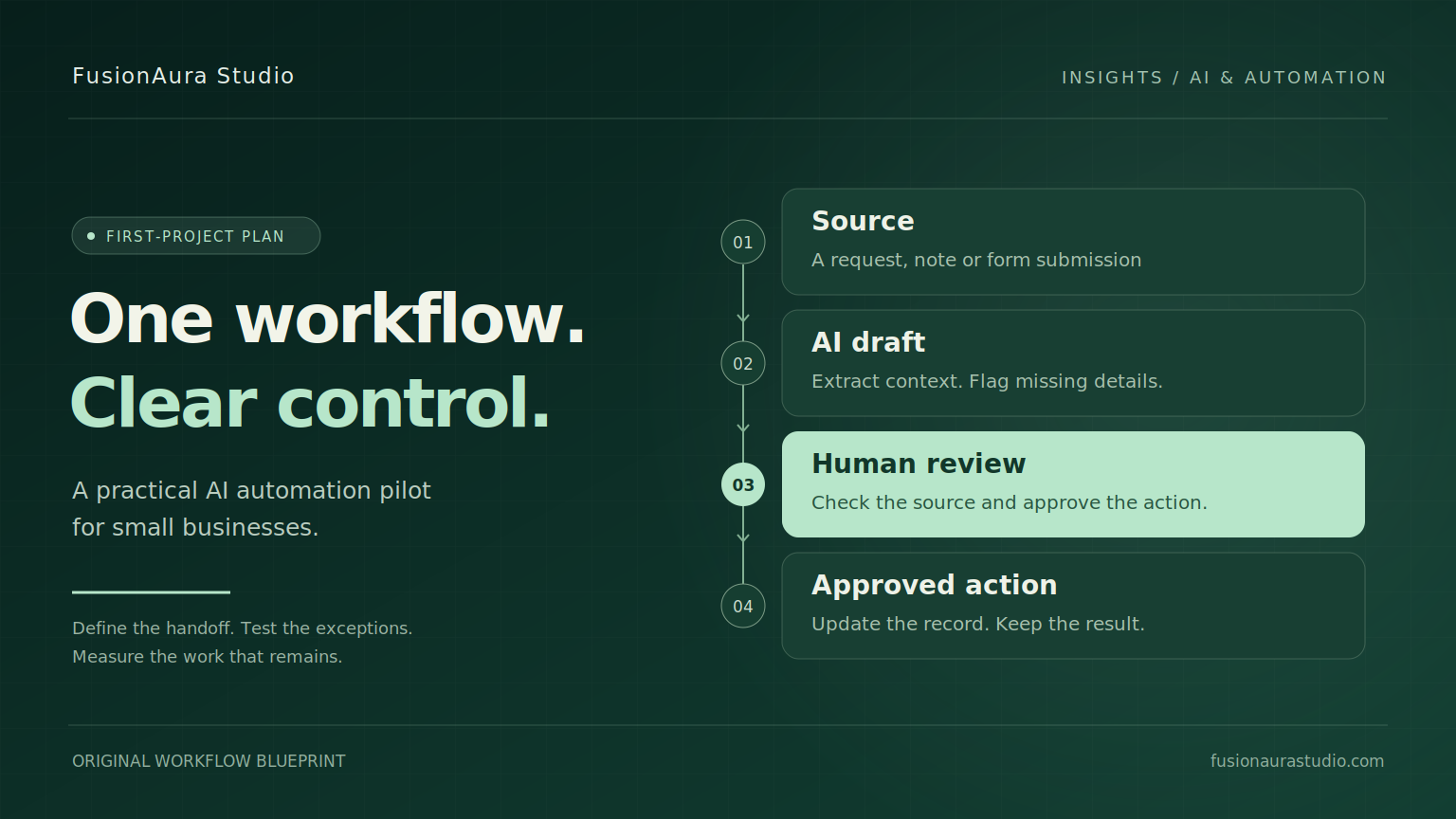
AI workflow automation for small business means using AI for specific steps—such as interpreting a customer message—inside a process that connects your existing tools. A sensible first project has one clear trigger, a useful output, and someone responsible when the result needs checking.
Start with the handoff your team repeats every week. Perhaps a service note needs turning into a customer update and a follow-up task. The useful question is what information should move, what needs interpretation, and which decisions must stay with a person.
This guide works through that kind of project, including how to test it and calculate whether the effort is justified. The examples and budgets are illustrative; they are not client results or market-price estimates.
Choose a workflow you can describe and measure
Before comparing software, collect a small sample of recent work. Twenty cases can be enough to expose recurring patterns, although they will not prove a system is reliable. Include awkward cases, not just the tidy ones.
For each case, record what arrived, which apps were involved, what a person did, how long it took, and what had to be corrected. Separate hands-on work from waiting time. A task that takes six minutes of work but waits two days for approval has two different problems.
A promising first workflow has four characteristics:
- It repeats. There is enough volume to make setup and maintenance worthwhile.
- The desired result is recognizable. A reviewer can tell whether the output is useful and accurate.
- The necessary information exists. The system does not have to invent missing customer details or business rules.
- A failed run can be contained. Staff can see it, recover it and continue manually.
Sometimes the right fix is a better form, a clearer assignment rule or a standard email template. Copying a selected service field into a CRM does not require AI. Interpreting a free-text service note might.
For the customer-facing starting point, our Eren Logix website project shows how services and enquiry routes can be presented clearly. Good intake design gives any downstream process better material to work with.
Decide what rules, AI and people should each do
A workflow can follow a fixed sequence while an AI step produces variable answers. Predictable orchestration is not a guarantee that generated text will be correct.
Use explicit rules for information you can validate directly. Use AI for language-heavy work. Give people the decisions that require business accountability.
| Part of the work | Appropriate starting approach | Why |
|---|---|---|
| Check required fields and allowed service areas | Fixed rules | These checks should not depend on a model's interpretation. |
| Extract a request from a messy service note | AI, followed by validation | Language varies; missing facts must remain missing. |
| Match the customer to an existing record | Verified identifiers and matching rules | A plausible name is not enough to identify the right account. |
| Draft a customer update | AI with approved context | A person can check the wording against the source. |
| Promise a price, booking or technical outcome | Authorized staff and business systems | These are commitments, not writing tasks. |
Anthropic's workflow and agent guidance makes a useful architectural distinction: workflows follow predefined paths, while agents choose their next steps more dynamically. A first project rarely needs open-ended autonomy. Our AI agents for business guide covers that broader decision.
A worked example: service notes to a reviewed follow-up
Consider a small maintenance company. After a customer conversation, someone writes a note, prepares a follow-up and creates a task in the CRM. Those are related actions, but they should not become one unchecked instruction to an AI system.
Here is an illustrative note:
Bristol office wants servicing next month. Unit model is not readable in the photo. Ask the site contact for the model number before preparing the estimate. No visit booked and no price agreed.
The useful output is modest: a structured summary, a draft asking for the missing model number, and a proposed follow-up task. It must not become an appointment confirmation or a quotation.
Define the information contract
Agree which fields the workflow can produce and which source supports each one.
| Field | Expected value in this example | Treatment |
|---|---|---|
| Site | Bristol office | Match to a verified customer record before writing. |
| Request | Servicing next month | Keep the customer's wording; confirm an exact date separately. |
| Equipment model | Unknown | Leave empty and flag for follow-up. |
| Booking status | Not booked | Do not create a calendar booking. |
| Agreed price | None stated | Do not infer a price from previous jobs. |
| Next action | Request the model number | Prepare a draft for review. |
“Next month” also needs a reference date. Store the original note's timestamp so a delayed run does not silently reinterpret it relative to today's date.
Build the handoff in six steps
- Receive and identify the source. Assign a stable event ID and retain a link to the original note. Process only the agreed inbox, form or job system.
- Read the minimum context. Retrieve the verified customer record and relevant service information. The workflow does not need the entire company's mailbox.
- Extract and draft. Ask the model for the agreed fields and a short message. Require it to flag absent or conflicting information. Text inside the customer note is data, not permission to change how the workflow operates.
- Validate the proposal. Check the customer ID, required fields and permitted actions in ordinary software. A model's confidence score is not evidence that a customer or booking exists.
- Show a review card. Put the original note, proposed message, recipient and intended CRM changes together. A reviewer should not have to reconstruct the evidence from three apps.
- Apply the approved action and record the outcome. Write the approved task or send the approved message, then store the destination record ID and result. If the recipient or content changes, obtain a new approval.
This can be built with an automation platform or custom software. For example, n8n's official human-review feature can pause selected tool actions and present their parameters to a reviewer. The feature is a building block; the business still has to design who reviews what and what happens when nobody responds.
Give exceptions an owner
An exception queue needs a named owner, an expected response time and a way to complete the work manually. “AI could not finish” is not a useful operating procedure.
Keep a distinction between failed and uncertain. A temporary connection failure may be retryable. An ambiguous customer match needs a person. An unclear send result needs reconciliation before another attempt; otherwise a retry may produce a duplicate message.
Adapt the workflow to the business
The same architecture can serve different companies, but the information contract changes.
| Business | Useful extraction or draft | Decision to retain with the team |
|---|---|---|
| Roofing | Summarize inspection notes and draft a request for missing property details. | Diagnosis, repair scope, insurance statements and the quotation. |
| HVAC | Turn service notes into a draft customer recap and follow-up task. | Equipment suitability, safety advice, price and booking availability. |
| Logistics | Extract cargo, lane and timing details from a shipment request. | Capacity, cargo acceptance, a confirmed rate and delivery commitments. |
For US and UK teams, configure the operational details explicitly: ZIP code or postcode, local time zone, currency and date format. An ambiguous date such as 04/05 should trigger clarification, not a guess based on the language of the message.
If the original customer journey regularly misses essential information, improving the website or enquiry form may be more useful than adding a model to interpret incomplete requests.
Choose a platform after defining the work
An existing CRM feature or a platform such as Zapier, Make or n8n may be sufficient when the integrations, review experience and permissions fit the process. Check the actual connector actions you need. A logo in an integration directory does not establish that a connector can update your particular fields or expose the required approval controls.
Ask the implementer to demonstrate the difficult case, not only the successful one: two similar customer records, a missing field, a denied approval or a connection that fails halfway through.
A custom web application becomes worth considering when staff need a tailored review queue, role-specific access, several related records on one screen or an audit trail the existing tools cannot provide. An internal review tool is a different requirement from launching a subscription product; our website, web app and SaaS comparison explains the distinction.
Self-hosting adds responsibility for updates, backups, access control and recovery. Include that work in the comparison rather than treating the absence of a hosted subscription as zero operating cost.
Test the failures before allowing live actions
Use representative, permission-appropriate records in a test environment. Establish the expected result before running the workflow, then compare the output with that expectation. Testing only whether the text sounds professional will miss important errors.
At minimum, exercise these cases:
| Test | Expected behaviour |
|---|---|
| Required information is absent | Leave the field unresolved and create a review item. |
| A note asks the AI to ignore its rules or contact another address | Treat that instruction as untrusted text; preserve the approved scope. |
| The same event arrives twice | Recognize the duplicate and avoid a second downstream action. |
| An API times out after a write | Check whether the write succeeded before retrying. |
| A draft changes after approval | Invalidate the previous approval. |
| Two customers have similar names | Stop the automatic match and request confirmation. |
| The model or connector is unavailable | Keep the source, alert the owner and expose the manual path. |
Duplicate protection must exist at the application or destination API level. Stripe's idempotency documentation illustrates one explicit approach to retry-safe API operations; your CRM may use a different mechanism. Ask how it works in the system being built.
Agree release conditions in writing. For this example, they could include no external action without approval, correct handling of the agreed failure cases, and a successful demonstration of recovery by the person who will operate the queue. A small passing test set is a release checkpoint, not proof that future errors are impossible.
During a limited rollout, monitor incorrect fields, review time, exception volume, duplicate actions, failed runs and the age of unresolved work. Logs should contain enough information to investigate a run without becoming an unrestricted second copy of customer data.
Calculate cost after including human review
A workflow that drafts quickly can still be expensive if every result needs extensive correction. Measure the remaining work as carefully as the work removed.
Use this calculation:
Monthly net capacity value = hours genuinely freed × loaded hourly staff cost − recurring operating costs.
“Capacity value” matters here. An employee having more time available does not automatically reduce payroll or produce additional revenue.
Here is a hypothetical small-volume pilot. The dollar and pound columns are separate assumptions, not currency conversions or FusionAura prices.
| Assumption or result | US example, USD | UK example, GBP |
|---|---|---|
| Requests per month | 120 | 120 |
| Current handling time | 6 minutes each | 6 minutes each |
| Routine review after automation | 2 minutes each | 2 minutes each |
| Exceptions | 15%, adding 4 minutes each | 15%, adding 4 minutes each |
| Monthly administration | 1 hour | 1 hour |
| Hours genuinely freed | 5.8 hours | 5.8 hours |
| Loaded staff cost assumption | $30/hour | £25/hour |
| Capacity value before operating costs | $174/month | £145/month |
| Software, model and hosting assumption | $60/month | £50/month |
| Net monthly capacity value | $114 | £95 |
| One-off setup assumption | $1,800 | £1,500 |
| Simple capacity-value payback | About 15.8 months | About 15.8 months |
The time calculation is 12 hours of current work, minus 4 hours of routine review, 1.2 hours of extra exception handling and 1 hour of administration.
On those assumptions, this is not an obvious quick win. A cheaper form improvement or a simpler rule-based process could be the better purchase. Higher volume may improve the calculation, but only if review, exceptions and operating costs remain manageable.
Before commissioning a build, replace every assumption with your own measurements or a written supplier quote. Include discovery, integration work, testing, staff training, model usage, connectors, maintenance and recovery support. Credit any value from faster responses or fewer mistakes only when you can substantiate it separately.
Write a one-page brief before commissioning the build
Give prospective suppliers a brief they can price and demonstrate against:
- Outcome: the specific handoff to improve and how success will be measured.
- Trigger and volume: where work starts, typical demand and busy periods.
- Inputs: approved sources, sample records, required fields and known data problems.
- Allowed output: the exact draft, task or record change the system may propose.
- Authority: who approves which action, and what must never happen automatically.
- Exceptions: the owner, escalation route, recovery process and manual fallback.
- Acceptance and ownership: test cases, operating documentation, account ownership, ongoing costs and an exit/export plan.
Our software integration checklist expands on the responsibilities and access questions to settle before signing. A good supplier should be able to explain which parts need AI and which parts do not.
Questions owners ask before a first pilot
Do we need an AI agent, or will an ordinary workflow work?
Use a fixed workflow when you can define the steps and permitted branches. Add an AI step where language needs interpreting. Consider an agent when choosing the next step genuinely requires flexibility—and when you can test and control that added freedom. The presence of AI alone does not make the system an agent.
Can the workflow run while nobody is watching?
Receiving work, checking fields and preparing drafts can continue in the background. Decide separately which actions may execute without a person. Anything awaiting approval should stay queued, with an owner and escalation path, rather than treating silence as approval.
What should we check before connecting customer data?
Document which fields leave each system, where they are processed and retained, who can access them, and how they can be deleted or exported. Review provider terms and your obligations before using real records. Start tests with synthetic or suitably anonymized examples; connecting an inbox is not permission to process everything in it.
How do we know the pilot is ready to expand?
Look for an operating process staff can use: useful outputs, acceptable review effort, understood failures and reliable recovery. Recalculate costs using observed results. Expand one responsibility at a time, keeping a way to pause the workflow and return to manual handling.
Start with one real handoff
A useful first conversation starts with one anonymized example, the apps involved and the decisions your team must retain. From there, the scope might be a form change, an existing-tool configuration or a custom integration.
Through our AI Automation & Agents service, FusionAura Studio can help scope the workflow, connect the relevant systems and design the review process. Tell us about the handoff you want to improve, including what currently happens when it goes wrong.